
SEO for educational websites is different from standard SEO because students rarely make decisions after one search. A prospective student may compare career paths, program formats, tuition, locations, deadlines, accreditation, and outcomes before submitting an inquiry or application.
That means your website needs to appear across the full decision journey, not just when someone is ready to apply. Strong education SEO combines technical foundations, helpful program content, local or national visibility, and trust signals that help students and families feel confident taking the next step.
A Few Things Worth Knowing Before You Read On
Before you start applying these strategies, keep five things in mind.
- Education SEO usually has three search stages: awareness, comparison, and decision. Many schools focus too heavily on decision-stage searches and miss students earlier in the journey.
- Trust matters more in education than in many other categories because students are making decisions that affect their finances, careers, and future opportunities.
- Program pages are often the highest-value SEO assets on an education website because they connect search visibility directly to inquiries, applications, campus visits, and enrollment goals.
- Local SEO matters most for campus-based institutions, while topical authority and national keyword coverage matter more for fully online programs.
- Structured data can help search engines understand eligible pages, but it does not guarantee rich results, AI Overview inclusion, or higher rankings.
Why Education SEO Is A Different Challenge Entirely
Understanding why education SEO works differently from retail or local service SEO will save you from applying the wrong tactics and wondering why nothing moves.
The Student Search Journey Has Three Distinct Stages
Most industries deal with a short search-to-purchase cycle. A student choosing a college program does not. According to Google's research on higher education marketing, prospective students typically conduct dozens of searches over several months before making an enrollment decision.
The three stages look like this. In the awareness stage, students are exploring career paths and possibilities. They search for things like "best jobs with a biology degree" or "how long does it take to become an RN." In the comparison stage, they are evaluating specific programs and schools.
They search for "community college nursing program vs university" or "online RN to BSN programs in Texas." In the decision stage, they are ready to act. They search for "Lone Star College nursing application deadline 2026" or "how to apply to CUNY nursing program."
A school that only optimizes for decision-stage searches is invisible during the first two stages, which is where most of the actual research happens. This is why understanding customer needs and search intentmatters so much before building an education SEO strategy.
Trust Signals Matter More In Education Than Almost Any Other Industry
When someone chooses a school, course, certificate, or degree program, they are making a decision that can affect their career, finances, time, and future opportunities. That raises the standard for accuracy and trust.
Strong education websites make important details easy to verify. Program pages should clearly show accreditation, admissions requirements, tuition and fees, financial aid options, faculty or department credentials, career outcomes, contact information, and update dates where relevant.
Trust also depends on avoiding vague claims. Instead of saying a program prepares students for “exciting careers,” name the specific roles, explain the pathway, and support salary or job outlook claims with reliable sources such as the Bureau of Labor Statistics, College Scorecard, state workforce data, or institutional outcomes data.
You Are Optimizing For Two Audiences At Once
For undergraduate and traditional college programs, parents are actively involved in the research process. Your content often needs to satisfy two very different readers on the same page. A 19-year-old and their parent may land on the same program page but look for completely different things.
The student wants career outcomes and campus culture. The parent wants tuition costs, job placement rates, and accreditation details. Strong program pages address both without feeling like they are written for no one in particular.
With that context established, here are the 15 strategies.
Strategy 1: Pass Google's Core Web Vitals Benchmarks
Core Web Vitalsare Google's three main measurements of real-world page experience. Largest Contentful Paint measures how quickly the main content loads. Interaction to Next Paint measures how quickly the page responds to user interactions. Cumulative Layout Shift measures how visually stable the page is while loading.
For most pages, Google’s recommended benchmarks are an LCP of 2.5 seconds or faster, an INP of 200 milliseconds or faster, and a CLS score of 0.1 or lower.
For educational websites, the most important pages to test first are the homepage, program pages, admissions pages, financial aid pages, and high-traffic blog or guide pages. These are often the pages that influence inquiries and applications most directly.
Use PageSpeed Insights, Lighthouse, Chrome DevTools, and Search Console to identify problems. Common issues on education websites include oversized campus images, too many third-party scripts, slow forms, layout shifts from banners or embedded widgets, and older CMS templates that were not built with mobile performance in mind.
The goal is not to chase a perfect score. The goal is to make key pages fast, stable, and easy to use for students who may be researching on a phone, on a slow connection, or between other responsibilities.
Strategy 2: Build A Site Structure Students Can Navigate Intuitively
Search engines and students both need clear site architecture to find what they are looking for. A logical structure also distributes the authority of your domain across your most important pages through internal links.
The ideal structure for an education site starts with your homepage at the top, followed by clear category pages for each program area (Health Sciences, Business, Technology, Liberal Arts), then individual program pages nested underneath each category. Every program page should link out to related career articles, admission pages, and financial aid resources.
Your URLs should be descriptive and readable. A path like yourschool.edu/programs/nursing/rn-to-bsn is far more useful to Google and to students than yourschool.edu/page?id=4892. Clean URLs tell both audiences exactly what the page contains before they click.
Add breadcrumb navigation to all program and course pages. It costs almost nothing to implement and helps users understand where they are in your site hierarchy, which reduces bounce rates on pages that students land on directly from search results.

Strategy 3: Make Your Website Mobile-First, Not Just Mobile-Compatible
Test your mobile experience with Lighthouse, Chrome DevTools device emulation, PageSpeed Insights, and real-device testing. Do not stop at whether the page technically loads on a phone. Check whether students can read program details without zooming, tap “Request Information” or “Apply Now” buttons easily, complete forms without frustration, open tuition and admissions information, navigate back to related pages, and whether the experience follows basic web accessibility principlesfor all users.
Mobile-first also means accessibility matters. Text should be readable, buttons should be large enough to tap, forms should have clear labels, and important information should not be hidden inside hard-to-use menus or image-only content.
Strategy 4: Use Structured Data Where It Actually Helps
Structured data is code that helps search engines understand the content and purpose of a page. It can make eligible pages easier to interpret and, in some cases, qualify them for specific Google Search features.
For educational websites, the most useful structured data types are usually Course, Event, Organization or EducationalOrganization, BreadcrumbList, and VideoObject, where relevant.
Course-structured data can be useful for eligible course or program information, especially when the page clearly describes the course name, provider, description, and other required details.
Event structured data is useful for open houses, information sessions, webinars, application deadlines, orientation events, and scholarship events.
BreadcrumbList markup can help clarify site structure, especially on large education websites with many departments, campuses, programs, and resource pages.
FAQ content can still be useful for readers, but FAQPage markup should not be treated as a rich-result tactic. Google no longer shows FAQ rich results in Search, so visible FAQs should be written primarily to help students make decisions.
Before publishing structured data, test it with Google’s Rich Results Test or Schema Markup Validator and confirm that the visible page content matches the markup.
Implementing these does not require a developer for basic use. Google's Structured Data Markup Helper walks you through the process for each page type, and Google Search Console's Rich Results Testlets you verify that your markup is error-free before publishing.
Strategy 5: Secure Your Site And Fix Technical Errors Before Publishing New Content
HTTPS is a confirmed Google ranking signal and a basic trust requirement. If any part of your institution's website still serves pages over HTTP, that should be resolved before any other SEO work begins. Students and parents who see a "Not Secure" warning in their browser navigate away immediately, and Google treats secure sites as more trustworthy in its ranking evaluation.
Beyond HTTPS, run a technical audit using a tool like Screaming Frog or Google Search Console to identify broken internal links, duplicate page titles, missing meta descriptions, pages accidentally blocked from indexing, and redirect chains. These issues are common on large education sites that have accumulated years of content additions, CMS migrations, and structural changes.
The cleaner your technical foundation, the faster the rest of your SEO work will produce visible results.
Strategy 6: Map Your Keywords To All Three Stages Of Student Search
A keyword map is a document that assigns specific search terms to specific pages on your site, organized by the stage of the enrollment funnel each term serves. Building one before creating content prevents you from producing pages that target the wrong audience or that compete with each other for the same query.
Here is what a partial keyword map looks like for a nursing program at a mid-size US institution.
Awareness stage keywordstarget students who are still exploring. Examples include "how long does it take to become a registered nurse," "RN salary in Texas," and "is nursing school worth it." These belong on blog articles and career guide pages, not on your program application page.
Comparison stage keywordstarget students who have decided on a direction and are now evaluating their options. Examples include "RN to BSN programs online Texas," "accelerated nursing programs Houston," and "community college nursing vs university nursing." These belong on program pages and dedicated comparison content.
Decision stage keywordstarget students who are ready to act. Examples include "Houston Community College nursing application 2026," "RN to BSN HCC tuition cost," and "apply to nursing program online." These belong on program pages with strong calls-to-action and on your admission and financial aid pages.
Use Google Keyword Planner, Ahrefs, or Semrush to find real search volume data for each keyword category in your specific geographic market. If your team needs a broader framework before building this map, start with these keyword research strategies.

Strategy 7: Build Dedicated, Conversion-Ready Program Pages
Every degree, certificate, or training program your institution offers deserves its own dedicated page, fully optimized for the specific search terms students use when looking for that program. A general "Programs" page that lists everything in two sentences per program is not a ranking strategy; it is an organizational chart.
A well-structured program page should cover a clear program title using the exact terms students search for, a brief description of who the program is built for, eligibility and admission requirements, a curriculum overview with key course titles, career outcomes with specific job titles and median salary data referenced from the Bureau of Labor Statistics, tuition and financial aid information, a clear next step (apply, request information, or attend an info session), and a FAQ section with at least five to eight questions students commonly ask.
That last element, the FAQ section, is not just user-friendly. It feeds directly into Strategy 10 on AI Overview optimization and increases the chance your page captures featured snippet placement for question-based searches.
Strategy 8: Target Long-Tail Keywords That Large Universities Ignore
The biggest challenge smaller colleges and community colleges face in SEO is competing against institutions with multi-million dollar marketing budgets and decades of domain authority. The answer is not to fight them head-on for broad keywords. It is to go where they are not.
Large universities rarely produce content for hyper-specific long-tail queries because their content teams focus on high-volume brand terms and flagship program keywords. That leaves an enormous opportunity for smaller institutions willing to target specific, lower-competition phrases.
Instead of competing for "business degree," a regional college in Chicago might target "weekend MBA Chicago working adults," "affordable business certificate online Illinois," or "evening business administration classes Chicago suburbs." Each of these phrases has lower search volume but far less competition and attracts students who are much closer to making an enrollment decision.
Google's "People Also Ask" feature, Google Suggest (the autocomplete suggestions that appear as you type a query), and a free tool like AnswerThePublic are excellent starting points for finding long-tail keyword opportunities across your program areas.
Strategy 9: Publish Content That Reaches Students Before They Search For Your School
The majority of students who eventually enroll at your institution will never have heard of you when they begin their search. They start with questions about careers, not schools. If your website only publishes content about your own programs and campus, you are invisible during the stage when most students' decisions are actually forming.
Career-focused and learning-focused awareness content is the entry point. Articles like "What can you do with a healthcare administration degree," "Average cybersecurity analyst salary in California 2025," "CNA to RN bridge programs explained," and "multiplication tables for kids" attract students, parents, and learners at the very beginning of their research journey. When those articles are properly internally linked to your program pages, they guide readers deeper into your site and introduce your institution to an audience that was not yet looking for you.
This type of content also builds topical authority (covered in Strategy 11), which signals to Google that your site is a comprehensive resource on education in your program areas rather than simply a brochure for your institution.
Strategy 10: Structure Pages For Clear Answers, Featured Snippets, And AI Search Experiences
Google’s search results increasingly include summaries, AI-generated answers, featured snippets, People Also Ask results, videos, local results, and traditional organic listings. Education websites should structure content so both readers and search systems can quickly understand the answer.
Use clear question-based headings where they match real student questions. Answer the question directly in the first sentence or two, then add details, examples, requirements, or next steps.
For example, a program page should not bury tuition, deadlines, format, or admissions requirements several scrolls down the page. Students should be able to find those answers quickly.
- Good answer formatting includes:
- Short definitions for basic questions.
- Bulleted requirements for admissions or eligibility.
- Comparison sections for similar programs.
- Tables for tuition, timelines, or format differences when the CMS supports them.
- Visible FAQs for common student concerns.
Do not treat schema or formatting as a guarantee of AI Overview visibility. Structured, accurate, helpful content may make a page easier to understand, but Google does not require special schema markup for generative AI Search features.

Strategy 11: Build Topical Authority Around Your Core Programs
Topical authority is earned when Google recognizes your website as a comprehensive, trustworthy source on a specific subject area rather than just a single page about it. For education sites, this means building content clusters around each major program you offer.
A content cluster has three components. The pillar page is your main program page, for example, your Bachelor of Science in Cybersecurity page. Supporting articles are related blog posts and guides that cover adjacent topics in depth, such as the cybersecurity job outlook, top certifications for cybersecurity professionals, and how to break into cybersecurity without a prior degree. Internal links connect the supporting articles back to the pillar page and to each other.
When a school consistently publishes relevant, expert-level content around a program area, Google begins treating that site as an authoritative source on that topic. This improves rankings not just for the individual articles but for the program pages themselves.
The practical starting point is to identify your three most strategically important programs and publish five to ten supporting articles for each one before expanding to other program areas. Depth before breadth is the right sequencing here.
Strategy 12: Claim And Fully Optimize Your Google Business Profile
For any campus-based institution in the US, a well-optimized Google Business Profile (GBP) is one of the highest-return SEO investments available. It controls how your school appears in Google's local search results and on Google Maps, which is often the very first thing a prospective student sees when searching for programs in their area.
A complete GBP includes your verified institution name, address, phone number, and website URL. It also includes your accurate business category (use "University," "Community College," "Vocational School," or whichever most precisely applies), updated operating hours, a description that naturally includes your key programs and location, regularly posted updates about events and admission deadlines, and a strategy for collecting genuine student and alumni reviews.
Reviews can influence how prospective students evaluate a school in local search, but they must be collected ethically. Ask current students, alumni, and families for honest feedback where appropriate, and never offer incentives in exchange for positive reviews.
Specific, genuine reviews that mention programs, faculty support, campus experience, or career preparation can help prospective students understand what the institution is actually like. They also add credibility to your Google Business Profile and other local discovery surfaces.
If your institution has multiple campuses, create a separate verified GBP for each physical location rather than trying to consolidate everything under one profile.
Strategy 13: Target Local And Regional Keywords That Match Real Student Searches
Local keyword targeting goes beyond adding your city name to a page title. It means understanding how students in your specific market phrase their searches and building content that mirrors those patterns naturally.
In major US metro areas, students often search by neighborhood or borough as well as city. "Community college Brooklyn" and "community college New York" represent different intents and different competition levels. In smaller markets, county names and regional identifiers matter. "Nursing program Central Valley, California" faces different competition than "nursing program Fresno."
Location-based landing pages are a practical tool for institutions serving multiple geographic areas. A school with campuses in three cities can create a dedicated page optimized for each location's specific search patterns, covering local industry demand, regional salary data, and campus-specific details, rather than a single generic page trying to serve all three markets at once.
Include location references naturally in page titles, H1 headings, the introductory paragraph, and within alt text for locally relevant images. Once or twice per page in a natural context is sufficient. Forced repetition of location keywords reads poorly to both students and search engine crawlers.
Strategy 14: Build Backlinks That Actually Move The Needle For Education Sites
A backlink from a reputable external site tells Google that your institution is worth referencing. For education sites, the most valuable backlinks come from sources that already carry trust in the academic and public sector space.
The highest-quality backlink sources for US educational institutions include accreditation body websites (regional and national accreditors often list member institutions with links), scholarship directory sites, state and local government workforce development pages, local newspaper and television station coverage of programs or student achievements, industry association websites relevant to your program areas, and other educational institutions you partner with for transfer agreements or dual enrollment programs.
Guest contributions by faculty members to industry publications are another productive approach. A nursing program instructor who publishes a practical article on a healthcare industry publication and links back to the school's nursing program page builds both a backlink and an E-E-A-T signal in a single effort.
The governing principle is quality over volume. Five links from authoritative, relevant sources will move your rankings more than fifty links from low-quality directories or link-swap arrangements.
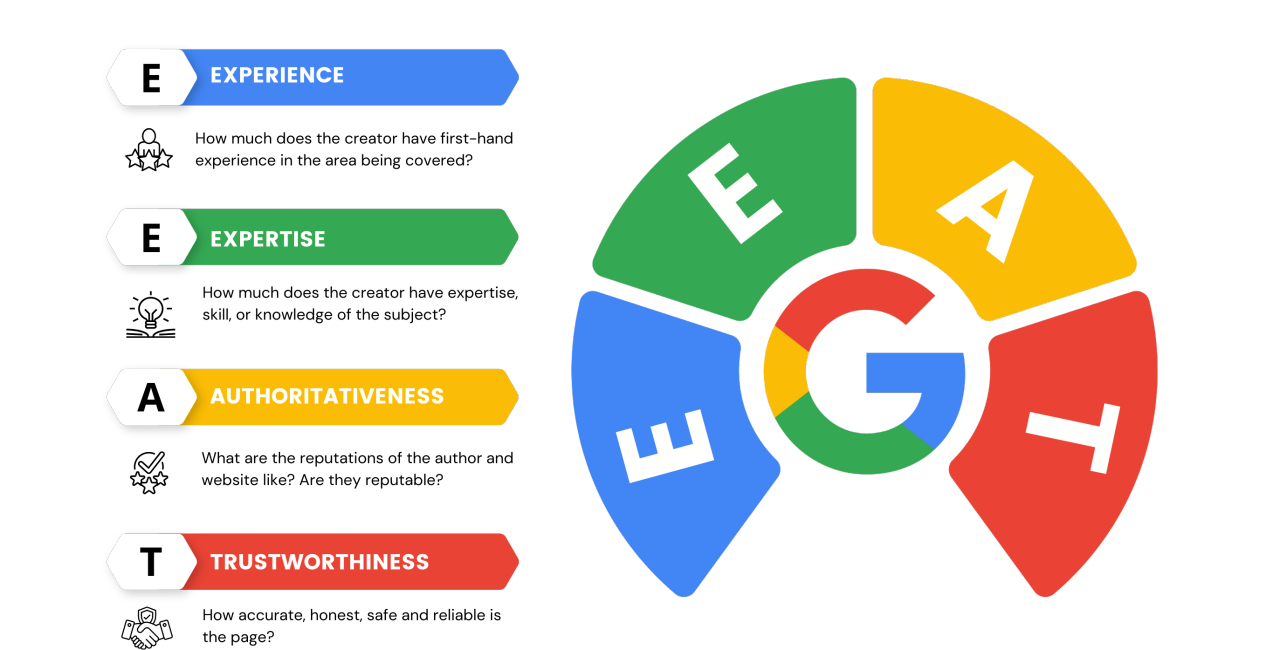
Strategy 15: Strengthen E-E-A-T Signals Students Can Verify
E-E-A-T stands for Experience, Expertise, Authoritativeness, and Trustworthiness. For educational websites, these signals matter because students and families need to know whether the institution is credible, current, and capable of delivering what it promises.
Strong trust signals include:
- Faculty and department bio pages with credentials, publications, licenses, industry experience, or professional background.
- Accreditation details on relevant program pages.
- Clear tuition, fees, financial aid, and scholarship information.
- Career outcome data that names the data source and date.
- Student or alumni testimonials with enough detail to feel credible.
- Current contact information for admissions, advising, financial aid, and departments.
- Program pages with visible update dates.
- Correction or update notes when important information changes.
Avoid unsupported claims such as “top-ranked,” “best,” “leading,” or “most trusted” unless the article or page clearly explains the source, criteria, and date behind the claim.
Local Campus SEO Vs. Online Program SEO
Not every strategy in this article applies equally to every institution type. Here is how to prioritize based on your model.
For campus-based institutions (community colleges, regional universities, trade schools, and K-12 private schools):The highest-priority strategies are Strategy 12 (Google Business Profile), Strategy 13 (local and regional keywords), Strategy 7 (dedicated program pages with local salary data), Strategy 5 (technical audit), and Strategy 14 (backlinks from local press and accreditors). Local search visibility drives the majority of inquiry volume for campus-based schools, and competing nationally is rarely the right goal for these institutions.
For fully online programs (online-only degree programs, EdTech platforms, and remote certification providers):Local SEO has minimal return because students are not choosing based on geography. The highest-priority strategies are Strategy 11 (topical authority content clusters), Strategy 9 (awareness-stage career content), Strategy 6 (national keyword funnel mapping), Strategy 10 (AI Overview optimization), and Strategy 15 (E-E-A-T signals through faculty credentials and outcome data). Online programs compete nationally, often against well-funded incumbents, so content depth and authority signals are the main differentiators.
For hybrid institutionsthat offer both in-person and online options, build your local SEO foundation first through Strategies 12 and 13, then layer in the national content strategy for your online programs using Strategies 9, 10, and 11.
How To Measure Whether Education SEO Is Producing Student Leads
Traffic alone does not prove that SEO is working. Educational institutions should measure whether organic search is helping students take meaningful next steps.
- For program pages, track organic sessions, request-information submissions, application starts, campus visit registrations, webinar signups, phone clicks, and advisor contact form submissions.
- For awareness-stage articles, track internal clicks to program pages, returning visitors, assisted conversions, email signups, and engagement with related admissions or financial aid content.
- For campus-based institutions, also review Google Business Profile calls, direction requests, website clicks, profile views, and search queries.
- For online programs, pay closer attention to non-branded organic traffic, program comparison keywords, cost-related searches, and conversion paths that include multiple visits over time.
The best SEO reports connect rankings and traffic to enrollment-related actions. A page that brings fewer visitors but more qualified inquiries may be more valuable than a page that brings high traffic with no student intent.
Where To Begin If You Are Starting From Zero
If your institution has not done meaningful SEO work before, sequence matters. Trying to run all 15 strategies simultaneously leads to scattered effort and slow results. Here is the recommended launch order.
- Step 1 (Weeks 1 to 2):Run a technical audit. Use Google Search Console (free) to identify indexing errors, Core Web Vitals failures, and mobile usability issues. Confirm HTTPS is active across all pages. This clears the path for everything that follows.
- Step 2 (Weeks 2 to 6):Build or rebuild your top three to five program pages using the structure from Strategy 7. These are your highest-value conversion assets. Add relevant structured data where appropriate, such as Course, Event, BreadcrumbList, or Organization markup, and keep visible FAQs focused on the questions students actually ask before applying.
- Step 3 (Weeks 3 to 8):Complete your keyword map for each program area following Strategy 6. You do not need all the content written yet. You need to know which pages and articles you are building and what each one is targeting before you begin producing them.
- Step 4 (Month 2):Claim and optimize your Google Business Profile if you have a physical campus. Full GBP optimization often produces visible local ranking improvements within four to six weeks.
- Step 5 (Month 2 onward):Begin publishing awareness-stage content following Strategy 9. Commit to a realistic publishing cadence you can sustain, even if that is one or two articles per month. Consistency over time produces better results than an initial burst followed by months of silence.
Many institutions can see early improvements from technical fixes, clearer program pages, and better local visibility within a few months. More competitive program keywords, national online programs, and content-driven growth often take longer. Set expectations based on your starting point, competition level, publishing cadence, technical health, and authority in the topic area.
Frequently Asked Questions
Does Social Media Activity Directly Improve A School’s Search Rankings?
Social media activity is not generally treated as a direct Google ranking shortcut, but it can support SEO indirectly. Social content can increase awareness, drive visits, attract links, promote events, and help students discover useful program or campus information.
Does A .edu Domain Give A School An Automatic Ranking Advantage?
No. A .edu domain may reassure users that an institution is legitimate, but it does not guarantee better rankings. Search visibility still depends on helpful content, crawlability, relevance, links, technical quality, and trust signals.
How Long Does SEO Typically Take To Produce Results For A School Website?
Many schools can see early improvements within a few months from technical fixes, program-page updates, and local SEO work. Competitive program keywords often take longer, especially in large markets or national online education categories.
What Should An Education Program Page Include For SEO?
A strong program page should include the program name, format, admissions requirements, tuition, financial aid, curriculum, accreditation, career outcomes, faculty or department information, next steps, and concise FAQs.
Is SEO Different For Online Programs And Physical Campuses?
Campus-based institutions usually need stronger local SEO, Google Business Profile optimization, and location-specific program pages. Online programs usually need deeper content clusters, national keyword targeting, comparison content, and stronger authority signals.
Conclusion
Education SEO works best when it helps students make better decisions. Start with the technical foundation so search engines can crawl the site and students can use it easily. Then strengthen the pages that matter most: program pages, admissions pages, financial aid pages, location pages, and high-intent comparison content.
From there, build helpful awareness-stage content that answers the questions students ask before they know which school they want. Support every important claim with clear evidence, keep program information current, and make the next step easy to take.
Large institutions may have bigger budgets and older domains, but smaller schools can still compete by being more specific, more local, more transparent, and more useful than broader competitors.